
Docket · by Adaptive Systems
LiveInvoices in, checked data out.
Drop in invoices, receipts and purchase orders, PDFs or phone photos, from Europe or the US. A model reads them; code finds every value on the page, does the maths, checks the IBAN or US routing number and the VAT number, and stops bank-detail swaps, duplicates and PO mismatches. Clean documents go straight to your accounting. The rest wait for a person, with the reasons.
The app runs real models, so it is password-protected. The numbers here come from it live.
How it works: the case study on GitHub- INReceivedupload · email · API · type from the bytes
- 01Readtext layer + a box for every word; scans: image + OCR
- 02Extractmodel returns value + exact quote + line
- 03Checkquote found on the page · maths · IBAN / ABA · VAT · dates
- 04Risk gate + Jevvendor · bank details · PO · duplicates · 2nd opinion
- OUTRoutestraight through, or a person with the reasons
- Documents processed
- … in the last 24 h
- Values verified
- found on the page + passed the checks
- Straight through
- no person needed (demo set: half are built to be caught)
- Median time
- upload to decision, all checks included
Show your working
Hover a value. See where it came from.
A real sample invoice and Docket's real reading of it: twelve values, each pinned to the words it was read from, every check passed, risk low, a second opinion that agrees. It went straight through.
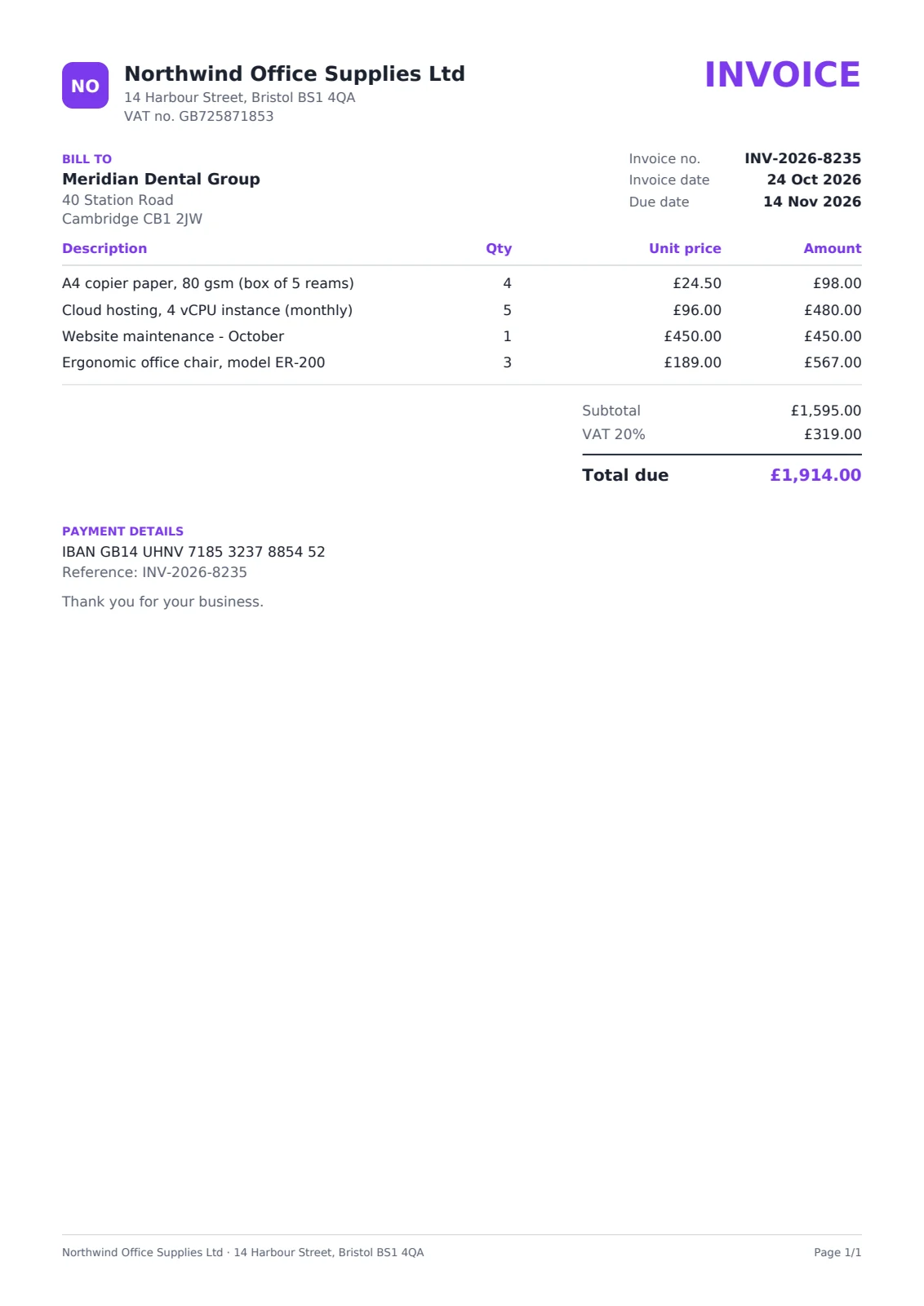
4 of 4 checks passed: lines sum, total sum, iban, vat id
Risk 5/100 · approved account on record · Jev second opinion agrees
Went straight through: nobody had to touch it. Hover a value to see where it came from.
Europe, the US, paper
PDFs, scans and phone photos. Eight countries.
A photo of an invoice has no text to check against, so Docket reads it twice: the vision model and OCR on our own server, which never sees the model's answer. A value is confirmed only when both agree digit for digit, and then it gets the same box on the page as a PDF.
- Scans and phone photos
- scanned pages read twice, by the model and by OCR that never sees its answer
- Currencies read, live
- from the documents read so far
- Tested on invoices from
- UKUSGermanyPolandNetherlandsFranceItalySpain
- local number, date and tax formats; EU VAT rate by rate (two rates on one invoice), US sales tax
- Bank details checked
- IBAN · mod-97US ACH · ABA routing
- a supplier asking to be paid into a new account, in Europe or the US, waits for a person
How it works
The model reads. Code decides.
- 01
Read
Uploaded, or emailed to the workspace's own address. PDFs keep their text layer with a box for every word; scans and photos go to the model as images and through OCR on our own server, turned upright first. The file type comes from its bytes, never its name.
- 02
Extract
A vision model returns each value with the exact text it read it from and the line it is on. No quote, no value. Not printed, not guessed.
- 03
Check
Code finds every quote on the page, re-reads the number from it, adds up the lines, checks discount, subtotal + tax = total (per VAT rate when an invoice mixes rates), the IBAN or US routing-number checksum, the VAT number format and the dates.
- 04
Risk gate
Is the vendor known? Is this the bank account they were paid on before? Same invoice again? Does it match its purchase order? A versioned policy decides, with reasons.
- 05
Second opinion
TypeSafe Jev rates the payment risk from the checks alone (never the document). It can only make the decision more careful.
- 06
Route + deliver
Clean documents go straight through to your accounting; the rest wait for a person with every reason in plain English and every value highlighted on the page.
Risk gate
Built to catch what costs money.
Reading a number right is half the job. The other half is noticing when a correct-looking document should not be paid.
Bank-detail swap
A real-looking invoice from a regular supplier with a new IBAN or a new US ACH account ("we changed banks") is the most common B2B fraud. A different account than the one on record stops the document: confirm by phone first.
New accounts need a person once
Documents are paid automatically only to an approved account. A new or unconfirmed one is approved once by a person, then flows.
Duplicates beyond the file
The same invoice sent again as a different file, re-scanned or forwarded: same number from the same vendor, or the same total and date, is caught.
Purchase-order match
An invoice naming a PO is matched to it (vendor, currency, total within a tolerance). Over the PO, or a PO that isn't on file, waits for a person.
Look-alike vendors and senders
"Nоrthwind" with a Cyrillic о, an invoice emailed from northw1nd.co.uk, or from a domain the supplier never used: stopped or flagged, and the email's DKIM signature is checked.
Policy you control
How strict each rule is (warn or stop), the risk threshold, PO tolerance and an approval limit are per workspace settings, versioned with every decision.
Caught so far
LiveMeasured, not promised
Accuracy on documents with known answers.
Every model we use reads the same synthetic set (UK, US, German, Polish, Dutch, French, Italian and Spanish documents, multi-page invoices, phone photos, discounts, two VAT rates on one invoice, deliberate errors and fraud cases) and code scores each value against the truth. Re-run after every change; the numbers below come from the latest run.
The model in production
LiveDocket · live activity
LiveIntegrations
Into the tools you already use.
Export verified batches
Excel (documents + line items), CSV or JSON of everything verified since the last export, with a person's corrections applied. Text can never run as a spreadsheet formula.
Signed webhook
Every verified, approved or rejected document as signed JSON (HMAC, Stripe-style) to n8n, Zapier, Make or your system. Retried with backoff; every attempt visible.
Invoices by email
Forward your invoices mailbox (Gmail filter, Outlook rule or your domain's forwarding) to the workspace's private address: every PDF or image attachment becomes a document, with who sent it.
Team notifications
When a document needs a person, the team hears it on Slack, Telegram or email: the vendor, the total, why it waits, and a link that opens it. Each channel is switched on separately; the file never leaves Docket.
Your vendor list
Import suppliers from your accounting system as CSV: VAT id, IBAN or US routing + account number, the domains they email from. Imported accounts count as approved, so the bank-change check works from day one.
Ready recipes
An n8n workflow appends each verified document to Google Sheets; from n8n or Zapier the same data can be mapped to Xero, QuickBooks or Sage bills (no direct accounting integration yet). Ours runs live into a sheet.
Questions
Asked before every rollout.
How does the team know a document is waiting?
The Review queue in the app is the full list, and Docket can also notify the team on Slack (a channel of your choice, e.g. #invoices), Telegram or email when a document needs a person, with the reasons and a link straight to it. You choose which decisions notify: only "needs a person", or also approved, rejected and straight-through ones.
What documents does it read?
Invoices, receipts, purchase orders and credit notes, as PDF, PNG, JPEG or TIFF, in any language the model reads. Scans and phone photos are read twice, by the vision model and by OCR that never sees the model's answer; a value is confirmed when both agree digit for digit, with its box on the page. European and US invoices alike: IBAN or ACH routing + account number, EU VAT rates (also two rates on one invoice), US sales tax, discounts.
Can the model invent a number?
It can try, but it can't get it through. Every value must come with the text it was read from; code finds that text on the page and re-reads the number itself. A value that isn't printed there, or isn't what is printed, turns red and a person decides.
Which model reads the documents?
The one that measures best on our test set with known answers, currently Gemini 3.5 Flash-Lite, with DeepSeek V4.1 Flash and GPT-6 Luna behind it if it fails. The accuracy numbers on this page are re-measured, never typed in.
Where does the data go?
Into your accounting through an export (Excel, CSV, JSON) or a signed webhook into n8n, Zapier or Make, and from there into Google Sheets, Xero or QuickBooks. Docket runs on our server or on yours; the files and their text stay there.
Can it read invoices straight from our mailbox?
Yes. Each workspace has a private address; forward your invoices mailbox to it or give it to suppliers. Attachments become documents, other files are listed and left out, auto-replies are ignored, and the sender is checked: the domain against what that supplier used before, look-alike domains and the email's signature.
How do you avoid paying a fraudster?
Documents are paid automatically only to a bank account a person has approved for that vendor. A changed account, a look-alike vendor or a duplicate stops the document with the reason, whatever the model thinks.
See them run on real data.
The apps run real models on every click, so they sit behind a password. Ask for a login or a guided walkthrough: talk to our AI receptionist in Front Desk, drop invoices into Docket, or load forged applicants into Dossier. Or try them in public: score a lead, read your invoice, forge an applicant, or connect Docket and Dossier to Claude. Or hire us to build yours.